Help Center Budgets
Budget totals explained
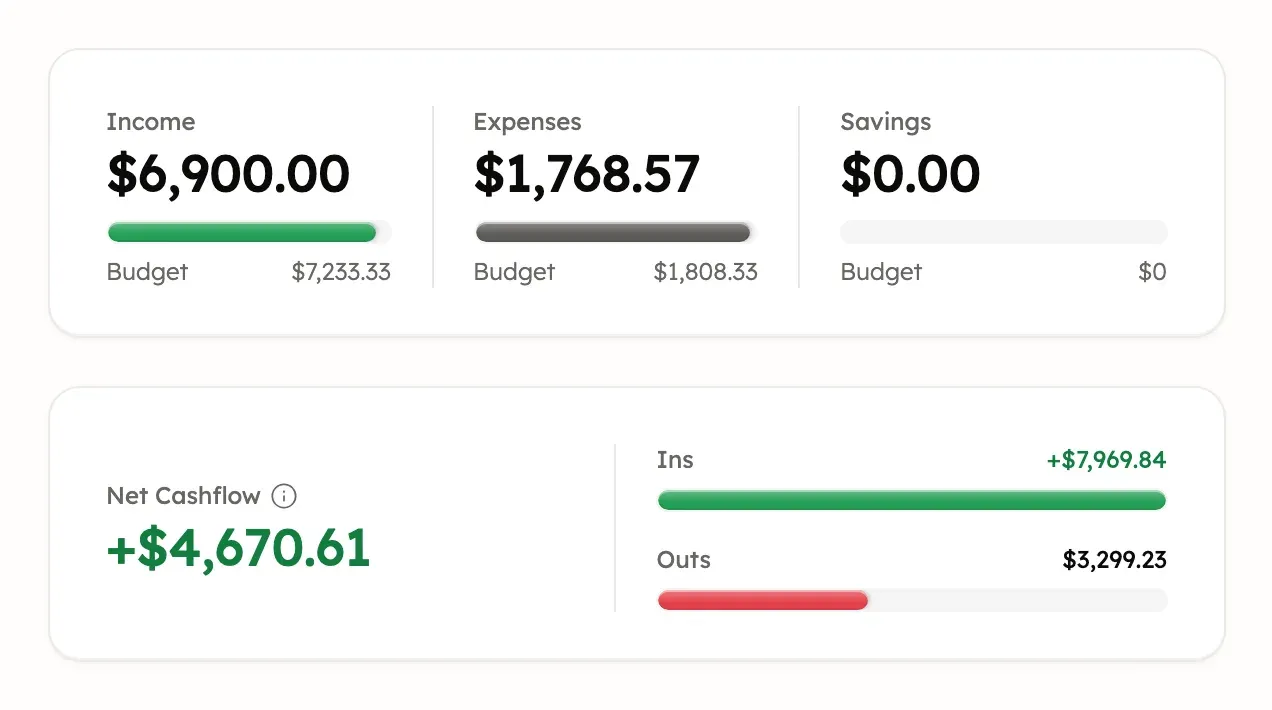
Income, Expenses and Savings compare your categories with your budget, while Net Cashflow is all money in minus all money out.
Updated
What Income, Expenses and Savings show
On a budget, Income, Expenses and Savings show how much went through the budget’s income, expense and saving categories in the period. The amount you budgeted is under each one.
What Ins, Outs and Net Cashflow show
On a budget, Ins is all money coming in and Outs is all money going out. Both include the budget’s categories and uncategorized transactions. Net Cashflow is Ins minus Outs.
For example, if $2,000 comes in and $1,500 goes out, Net Cashflow is +$500. These are example amounts.
Why Ins can be higher than Income
On a budget, Ins counts incoming money in any of the budget’s categories, plus uncategorized deposits. Income counts only the budget’s income categories. So a refund in an expense category, or an uncategorized deposit, adds to Ins but not to Income.
Why Net Cashflow isn’t your bank balance
A budget’s Net Cashflow covers only the period, accounts, categories and tags that budget includes. It can’t explain a change in your total bank balance.
Each period stands on its own: one month’s Net Cashflow isn’t carried into the next. To see another period, see Choose the period a budget shows.
If transfers make budget totals look too high
Moving money between your own accounts can count as both money in and money out. Settings → Preferences → Handle Internal Transfers decides what happens to transfers Treasury detects:
- Leave Unreviewed marks them for you to review, and they still count toward totals.
- Exclude from Budget keeps them out of budget totals.
- Auto-Delete moves them to Trash, where they stay for 30 days unless you empty it.
Excluded and deleted transactions never count toward budget totals. Putting a transaction in a Savings category doesn’t remove it from Ins or Outs.
If two budget totals don’t match
Two budgets show different totals when they include different periods, categories, tags or accounts. Before deciding a total is wrong, open each budget and compare those settings.
Currencies can change a total too: see Budgets in another currency and If an amount says not converted.
Get help with budget totals
Treasury AI can look through the transactions behind a budget total with you. Ask it why a total looks off. You can also open Help & feedback at the bottom of the sidebar, or in Settings on a phone. See What never to send.
Was this helpful?
Related guides
Questions about your own money?
Treasury AI can look through your accounts, budgets and transactions and answer in plain language. Something not working? Email support@treasury.sh.