Help Center Net worth and investments
Credit cards and loans
Credit cards and loans count as liabilities in your net worth, and their pages show what you owe, when it's due, your rate and your credit utilization.
Updated
How cards and loans count in net worth
Credit cards and loans are liabilities, so Net Worth subtracts what you owe on them. That covers connected cards and loans, and manual accounts with the Credit card or Loan type.
A card in credit, such as after a refund or an overpayment, has a negative balance. It lowers your liabilities. For the whole calculation, see How your net worth is worked out.
What a credit card’s page shows
Select a card in Net Worth to open its page. Current balance is what the card owes now. A badge such as Due in 5 days, Due today, Paid, Overdue or Not syncing shows where the bill stands. The 5 days is an example.
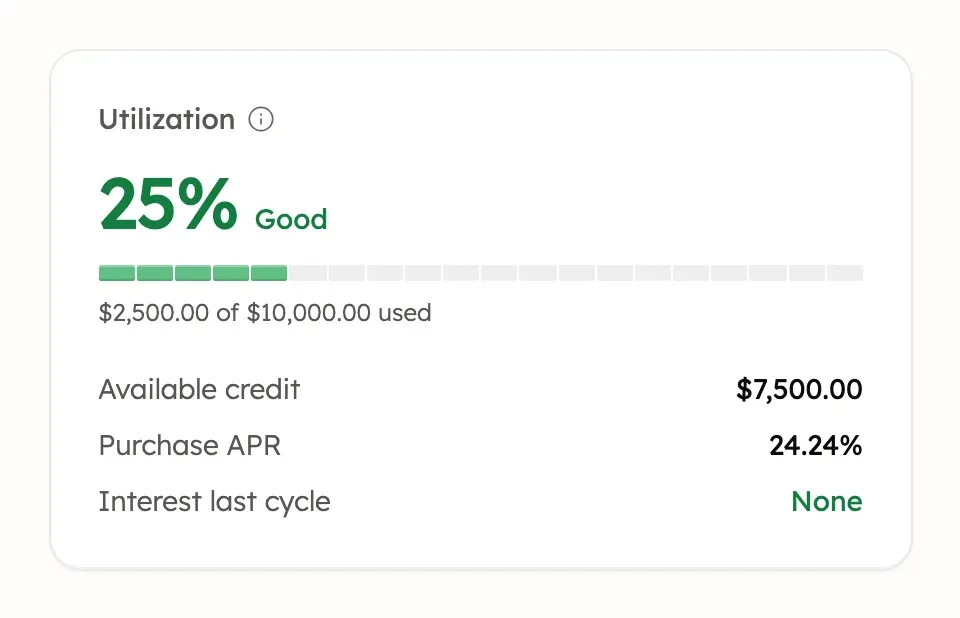
When your bank shares card details, the page also shows Statement balance, Payment due, Minimum payment and Last payment. The utilization panel adds Available credit, the Purchase APR and Interest last cycle.
If Treasury hasn’t yet asked a connected card’s bank for these details, the page shows Add card details. See If card or loan details are missing. Manual cards only show what you enter.
Credit utilization
Credit utilization is a card’s balance as a share of its credit limit. A $2,500 balance on a $10,000 limit is 25%. These are example amounts.
Treasury labels it Excellent under 10%, Good under 30%, Fair under 50%, High under 75%, and Very High from 75%.
Credit Utilization in Net Worth adds up every card with a known limit. Cards worth paying down lists up to two cards over 10%, highest first.
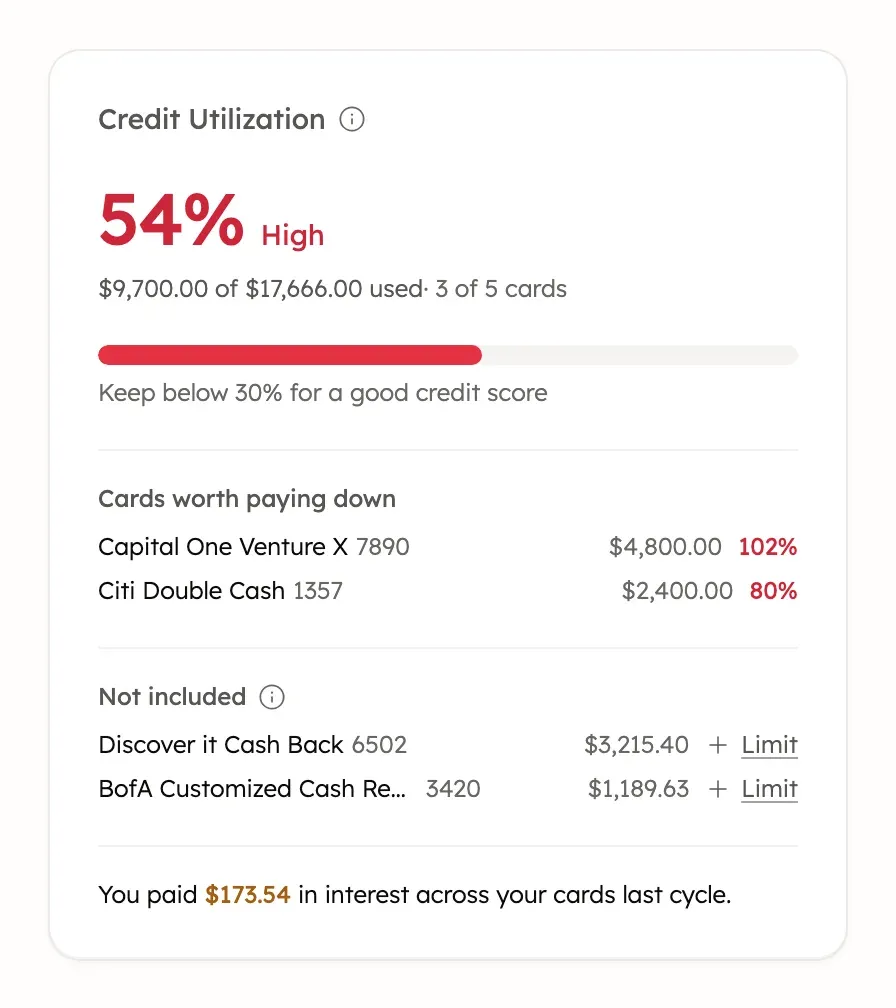
Not included lists cards with a balance that Treasury can’t count: ones with no known limit, or a balance in a currency with no exchange rate. Cards with Credit limit switched off are left out entirely.
Set a card’s credit limit
Treasury uses the limit your bank reports. You can set your own, for example when the bank doesn’t report one.
- In Net Worth, select the card.
- Select Edit account (the pencil), or Set this card’s credit limit ›. Limit beside a card under Not included opens the same window.
- Enter the Credit limit, then select Save changes.
To go back to your bank’s limit, clear the field and save. For a charge card with no preset limit, such as an Amex Gold, switch Credit limit off. Treasury then leaves it out of utilization.
The limit only changes in Treasury, never at your bank.
What a mortgage or loan page shows
Mortgages and student loans show their terms when your bank shares them. Beside Current balance, Payment due shows the date of the next payment. Monthly payment for a mortgage, or Minimum payment for a student loan, shows the amount. Last payment shows the one before.
The loan panel shows the Interest rate, Expected payoff or Paid off by, Principal paid this year and Interest paid this year. Mortgages can add Escrow balance, and student loans a Repayment plan.
If Treasury hasn’t yet asked a connected mortgage or student loan’s bank for its terms, the page shows Add loan details. Other loans, such as auto and personal loans, and manual loans show the balance and activity only.
Ask Treasury AI about cards and debts
Treasury AI can read your cards and loans to answer questions about them. It can show:
- your credit utilization, overall and per card;
- each card’s statement, minimum, due date, APR and last cycle’s interest;
- your debts with rates, payments and interest, ordered by highest rate or smallest balance.
Cards Treasury can see you pay in full each month don’t count as debt in those answers. Treasury AI can’t pay a bill, move money or change a limit.
Card and loan payment reminders
Treasury can remind you before a card or loan payment is due. See Card and loan payment reminders.
Was this helpful?
Related guides
Questions about your own money?
Treasury AI can look through your accounts, budgets and transactions and answer in plain language. Something not working? Email support@treasury.sh.