Help Center Net worth and investments
Track your net worth
Net Worth adds up what you own across your accounts, subtracts what you owe, saves the total once a day, and lets you fix past days in History.
Updated
How your net worth is worked out
Net worth is everything you own minus everything you owe, across your connected and manual accounts.
- Cash and investment accounts count as assets.
- Credit cards and loans count as liabilities.
- Other accounts, such as a home or car, count as an asset when you have the balance and a liability when you owe it.
For balances in another currency, see Net worth, recurring and investment totals.
Net worth chart and time periods
The large amount at the top of Net Worth is your net worth now, with the change over the period you pick. Choose 1W, 1M, 3M, YTD, 1Y or ALL.

Treasury saves your net worth once a day, in the evening US time. Today’s point uses your current balances. Your chart starts when you joined Treasury, unless you add earlier entries or import a balances file.
What Assets, Liabilities, Net Cash and Debt Ratio show
Four numbers in Net Worth sum up your accounts in your primary currency.
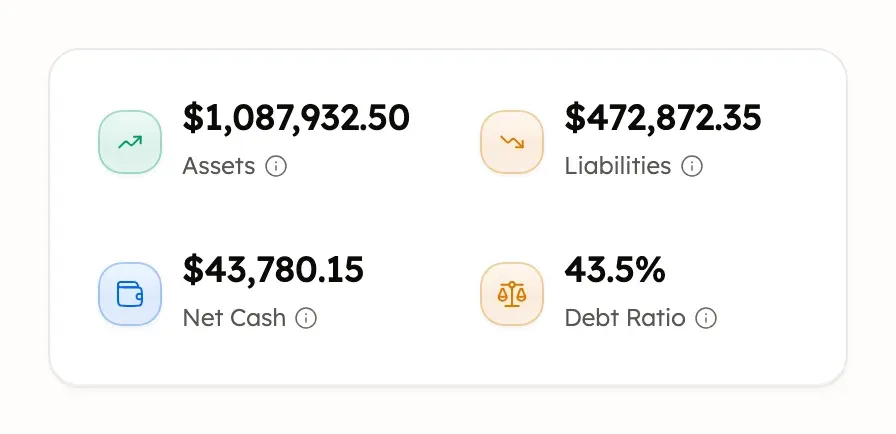
- Assets is everything you own, and Liabilities is everything you owe.
- Net Cash is your cash account balances minus your credit card balances: what you could spend today without new debt.
- Debt Ratio is liabilities divided by assets. Under 20% is excellent, 20% to 40% is good, 40% to 60% is fair, and 60% or more is high.
For example, $50,000 of liabilities against $200,000 of assets is a 25% debt ratio. These are example amounts.
Net Worth also shows Credit Utilization, how much of your cards’ limits you use. See Credit utilization.
Open an account’s details
Select any account in Net Worth to open its page. The page shows its balance, its money in and out, Top Categories, Recurring payments and its transactions.
Edit account (the pencil) can rename the account or set a card’s credit limit.
Connected accounts get their balances from your bank. To change a manual account’s balance, edit it in Manual Accounts.
Add, edit or delete past net worth
In Net Worth, select History to see one saved net worth per day.
- To add a day, select Add entry. Choose the Date, enter the Net Worth Amount and select Add Entry.
- To change a day, open its ⋯ menu and select Edit. Change the date or amount, then select Save Changes.
- To delete a day, open its ⋯ menu, select Delete, then Delete Entry. To delete several, tick them and select Delete.
Each date can have one entry, and that evening’s save replaces today’s entry. For entries in another currency, see Net worth, recurring and investment totals. Changing history doesn’t change any account balance or transaction. Treasury AI can explain your net worth, but it can’t edit these entries.
Deleted net worth entries can’t be restored.
If your net worth looks wrong
Check these common causes, starting with the biggest accounts in Net Worth:
- A manual account’s balance is out of date. Update it.
- A credit card, loan or Other debt was entered with Have instead of Owed.
- An account an import created has no balance yet, so it counts as zero.
- The same account appears twice, once connected and once manual. Merge the manual one.
- An account is excluded, or its bank connection is disconnected, so it’s left out.
- A brokerage’s balance comes from the brokerage, so it can differ from the total in Investments.
- A bank needs reconnecting, so its balance is old. See If your bank shows Action Required.
Was this helpful?
Related guides
Questions about your own money?
Treasury AI can look through your accounts, budgets and transactions and answer in plain language. Something not working? Email support@treasury.sh.