Help Center Account and billing
Contact support
Send a help request, bug report, idea or billing question from Help & feedback in the app, or email Treasury support if you can't sign in.
Updated
Open Help & feedback
Help & feedback is where you write to the Treasury team from inside the app.
- On a computer, select Help & feedback at the bottom of the sidebar.
- On a phone, open Settings and select Help & feedback under Support.
A red dot beside Help & feedback means Treasury has replied to you.
Send a request
- Open Help & feedback.
- Under Start a request, choose the option that fits:
- Bug report: something isn’t working as expected.
- Feature idea: something you’d like Treasury to do.
- Help request: how to do something in Treasury.
- Billing & account: subscriptions, payments or account access.
- Write your message and select Send message.
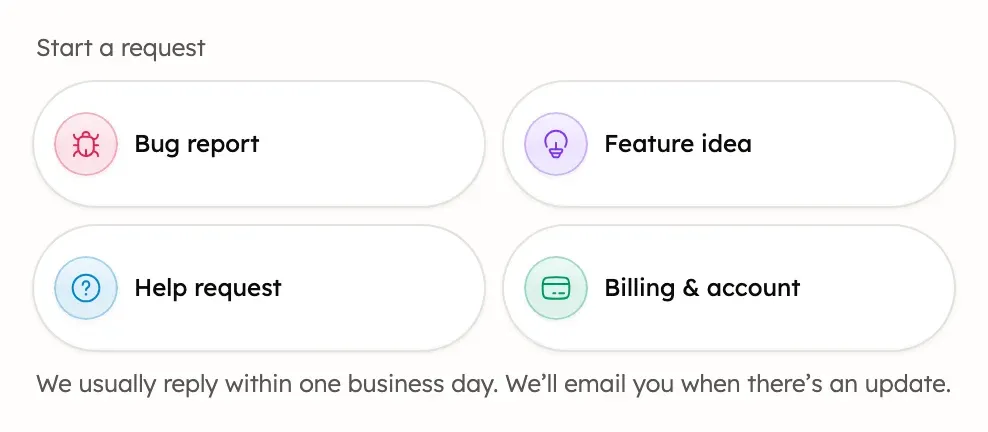
Help & feedback says: “We usually reply within one business day. We’ll email you when there’s an update.” Treasury AI can’t send a request for you, so use Help & feedback to reach a person.
See your requests and replies
Your conversations with the Treasury team stay in Help & feedback.
- Open Help & feedback. A new reply shows at the top as Treasury replied.
- Select a request under Recent requests, or select View all requests, then Active or Resolved.
- To answer, write in Write a reply… and select Send message.
Each request shows Awaiting Treasury, Awaiting your input or Resolved. A resolved request can’t take new replies, so start a new request instead.
Email support
Email support@treasury.sh if you can’t sign in or can’t use Help & feedback. Send it from the address on your Treasury account, so the team can find it.
You can also reply to Treasury’s tips and billing emails. For privacy questions, email privacy@treasury.sh.
What never to send
Never send passwords, sign-in codes or full card or account numbers, in a request, an email or a chat with Treasury AI. Treasury has no passwords. It never asks for your bank password or security codes, except inside the Plaid window when you connect a bank.
To point to an account, give its name and the last four digits. For a charge, give the date and amount.
Was this helpful?
Related guides
Questions about your own money?
Treasury AI can look through your accounts, budgets and transactions and answer in plain language. Something not working? Email support@treasury.sh.